Create an exceptionally realistic, high-resolution full-body men's fashion portrait of a stylish young adult Indian man with a naturally attractive appearance, athletic physique and confident masculine presence. The photograph should have a premium Instagram fashion-editorial aesthetic while maintaining genuine photographic realism.
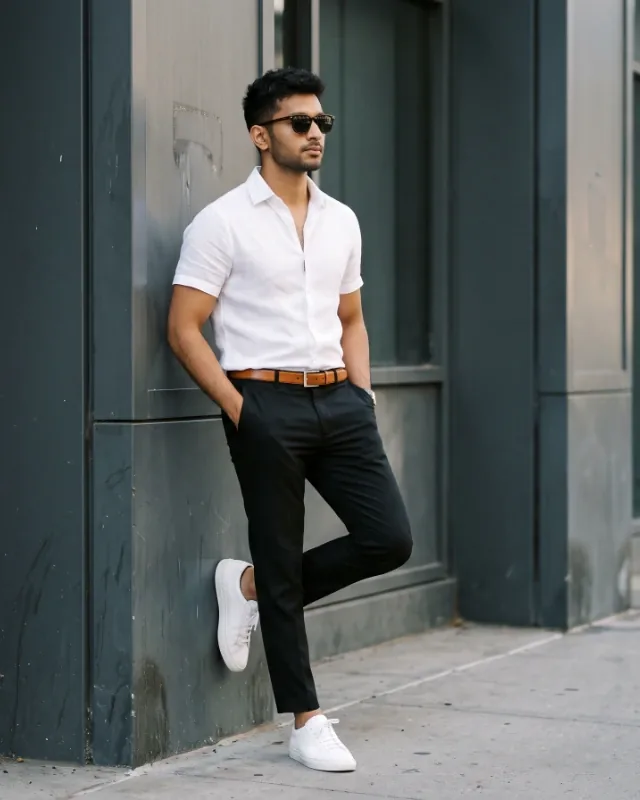
**Pose and composition:** The man stands casually against a dark, textured architectural wall with modern industrial details and subtle vertical panels. His posture is relaxed yet sophisticated, with one leg slightly bent and his foot resting against the wall while the other leg supports his weight naturally. Both hands are comfortably placed inside his trouser pockets. His torso is angled slightly to the right, with his head turned in the same direction, looking beyond the frame with a calm, confident and composed expression. Dark stylish sunglasses complete his effortless appearance.
**Outfit and styling:** He wears a crisp white, short-sleeved, slim-fit dress shirt made from premium lightweight cotton or linen. The shirt has a neat structured collar, subtle detailing and a few top buttons left undone for a relaxed smart-casual appearance. Pair it with tailored slim-fit trousers in deep black or dark navy, slightly cropped just above the ankles. A caramel-brown leather belt with a polished silver buckle adds a refined contrast. Complete the outfit with clean, minimalist white leather sneakers. Keep the entire outfit exactly as described, including its colours, fit and styling.
**Physical appearance:** Athletic but natural physique, broad shoulders, well-defined chest, toned arms and balanced body proportions. Realistic facial structure, natural skin texture, authentic hair details and believable anatomy. Avoid exaggerated muscles or artificial body proportions.
**Background and atmosphere:** A sophisticated dark charcoal or graphite architectural wall with subtle weathered textures, modern vertical panels and understated industrial details. Keep the background minimal and uncluttered to create a strong contrast against the white shirt and sneakers.
**Lighting and photography:** Soft directional natural daylight illuminates the subject from one side, creating realistic shadows and subtle highlights across his face, arms and clothing. Maintain natural skin tones, accurate white balance and detailed fabric textures. Use balanced exposure, subtle cinematic contrast and refined neutral colour grading.
**Camera and technical style:** Professional full-frame DSLR or mirrorless photography, 50mm or 35mm prime lens, f/2.8–f/4 aperture, eye-level camera angle, natural perspective and subtle background separation. Full-length vertical composition with the entire body, trousers and footwear clearly visible. Keep the subject sharply focused from head to toe.
**Final visual aesthetic:** Premium men's fashion magazine photography, sophisticated Instagram influencer style, effortlessly masculine, modern, minimal and elegant. The result must look like a genuine professional fashion photograph, not an AI-generated image or digital artwork.
Vertical 4:5 portrait composition, ultra-realistic details, high-resolution 8K quality, natural skin texture, realistic clothing folds, accurate hands and feet, no text, no watermark, no exaggerated retouching, no artificial lighting, no changes to the specified outfit, pose or background.