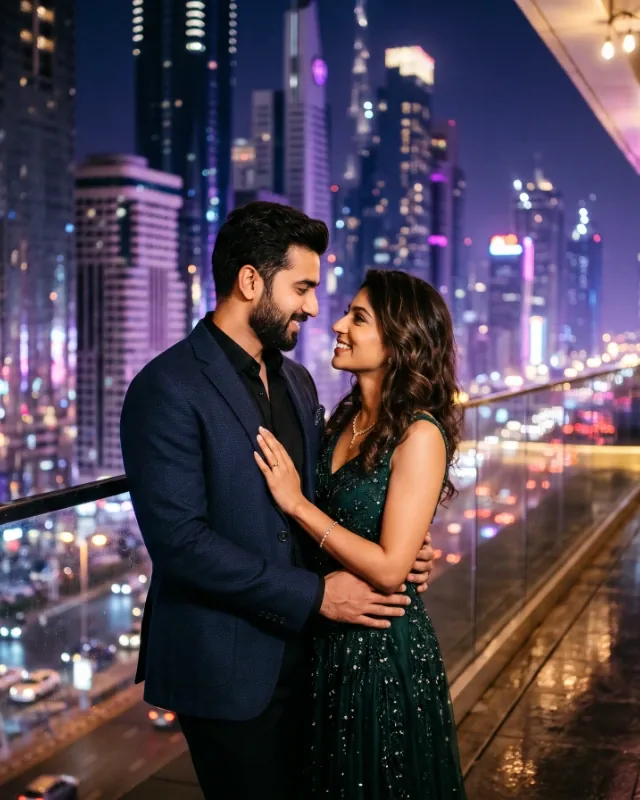
Ultra-realistic 8K cinematic romantic photograph of an Indian couple sharing an intimate moment on a rain-soaked modern city street during gentle evening rainfall. Vertical 9:16 aspect ratio.
Use the uploaded photographs of the man and woman as the exact facial identity references. Preserve both individuals' original facial identities as accurately as possible, including their original face shapes, facial proportions, eyes, eyebrows, noses, lips, jawlines, skin tones, and natural expressions. Do not beautify, reshape, modify, or replace either face. Both individuals must remain clearly recognizable as the same people in the reference photographs. Never merge their facial features or transfer features from one person to the other.
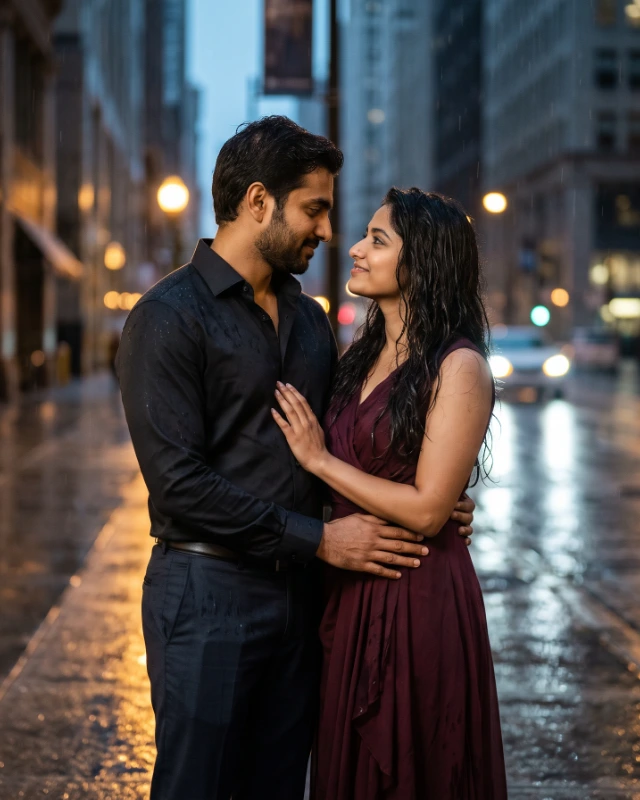
POSE AND BODY POSITIONING — EXTREMELY IMPORTANT: The Indian couple is standing close together on a rain-soaked city pavement. The man must always stand on the LEFT side of the composition, and the woman must always stand on the RIGHT side. The man faces slightly toward the woman, with his feet firmly planted on the pavement, torso upright, and shoulders relaxed. His right arm is gently wrapped around the woman's waist, with his hand resting naturally at her side. The woman stands close to him, with her body turned slightly toward him. One of her hands rests gently on his chest or shoulder, while her other arm hangs naturally beside her body. Her head is turned toward him, and she looks into his eyes with a soft, affectionate expression. Their faces are close but not touching. Both individuals have relaxed shoulders, natural body weight distribution, and genuine romantic expressions. Their standing posture must be physically natural and anatomically correct, with realistic arm positions, properly connected hands, balanced legs, and feet firmly grounded on the pavement. Do not change their positions, embrace, or hand placement.
OUTFIT AND APPEARANCE: The man wears a sophisticated fitted charcoal-black shirt with the top button casually open, paired with elegant dark tailored trousers. The shirt has realistic fabric texture and a slightly damp appearance from the rain. The woman wears an elegant deep burgundy Indo-western dress with a graceful flowing silhouette, delicate fabric detailing, and realistic natural folds. Her outfit must look sophisticated and romantic, not bridal. Her long, dark hair falls naturally over her shoulders, with a few slightly damp strands resting gently near her face. Keep both outfits identical in style and colour across generations. Do not introduce alternative clothing, additional accessories, or unexpected outfit changes.
ENVIRONMENT: The scene takes place on a beautiful modern city street during a gentle evening rain shower. The pavement is darkened by rain and covered with a thin layer of water, creating realistic reflections of warm streetlights and distant vehicle lights. The background contains softly blurred modern buildings, a few distant streetlights, subtle storefront illumination, and occasional out-of-focus vehicle headlights. Fine raindrops fall gently throughout the scene, with realistic droplets visible on the couple's hair, shoulders, and clothing. The rainfall is gentle and steady, never a heavy storm. The street feels peaceful and relatively quiet, with no distracting crowds, umbrellas, or prominent background characters. Keep the same urban street environment in every generation.
CAMERA AND COMPOSITION — EXTREMELY IMPORTANT: Capture a medium-full couple portrait, framing both individuals from approximately mid-thigh upward. Both faces, upper bodies, and romantic interaction must remain clearly visible. Position the camera directly in front of the couple at approximately eye level, using a natural three-quarter perspective. Keep the man on the left and the woman on the right in every generation. Both faces must be at approximately the same focal distance from the camera so that both remain equally sharp and recognizable. Use an 85mm portrait lens aesthetic, shallow depth of field, natural perspective, and soft background separation. Maintain the same framing, camera distance, subject scale, and composition. Do not use overhead angles, extreme wide-angle perspectives, or exaggerated close-ups.
LIGHTING AND COLOUR GRADING: Use rich cinematic evening lighting with warm golden streetlight highlights illuminating both faces and clothing. Add subtle cool blue tones to the distant rainy background, creating a consistent warm-versus-cool cinematic contrast. Soft directional light must illuminate both faces evenly while preserving natural skin tones and facial details. Include realistic shadows, delicate highlights on wet hair, and subtle reflections on the rain-soaked pavement. Background lights should produce elegant circular bokeh without becoming excessively bright or distracting. Use a sophisticated Indian romantic film-inspired colour grade with warm amber highlights, muted blue shadows, rich burgundy tones, and natural skin colours. Keep the lighting direction, intensity, colour palette, and cinematic atmosphere consistent.
IMAGE QUALITY: Photorealistic professional DSLR photography, ultra-detailed facial features, natural skin pores, realistic hair strands, detailed clothing textures, physically accurate rain droplets, realistic wet pavement reflections, natural hands, anatomically correct bodies, cinematic depth of field, subtle film grain, and premium photographic quality. The result must look like an authentic frame from a beautifully filmed Indian romantic movie, never an artificial AI-generated illustration.
NEGATIVE PROMPT: Different people, altered facial identity, generic model faces, merged faces, exchanged facial features, beautified faces, reshaped jawlines, artificial skin, plastic-looking skin, excessive face smoothing, unnatural expressions, exaggerated smiles, man on the right, woman on the left, incorrect subject positioning, standing too far apart, kissing, closed eyes, awkward hugging, unnatural hand placement, extra fingers, missing fingers, malformed hands, extra arms, extra legs, twisted bodies, floating feet, unsupported body positions, incorrect anatomy, inconsistent clothing, alternative outfits, bridal outfits, heavy rainstorm, umbrellas, crowded street, distracting people, excessive neon lights, fantasy effects, glowing particles, artificial rain streaks, oversaturated colours, extreme darkness, harsh flash, blurry faces, out-of-focus subjects, cartoon, painting, illustration, CGI, 3D render, text, captions, logos, watermark.
STRICT REPEATABILITY REQUIREMENTS: Keep the same two reference identities, the man on the left, the woman on the right, the same standing embrace, the same hand positions, the same charcoal-black men's shirt, the same burgundy women's outfit, the same rainy evening city street, the same eye-level camera angle, the same 85mm portrait lens aesthetic, the same medium-full framing, the same vertical 9:16 composition, the same warm golden street lighting, the same cool blue background, and the same cinematic colour grading. Do not introduce alternative poses, locations, outfits, props, camera angles, lighting setups, or creative variations. Prioritise accurate facial identity, physical correctness, and consistent scene reproduction over artistic improvisation. Every generation should recreate this same carefully defined romantic rainy street scene, using the uploaded reference photographs only to determine the identities of the two individuals.